When I announced my departure from IBM after 22 years of IT Delivery and Architecture I never imagined that I would be doing all of my interactions virtually. However, it has been very good so far. Thanks for joining me!

Virtual training is here and the participants are loving it!!
The feedback we have received from course participants has been unexpectedly positive. We are hearing from the participants that they are getting the course information, team break out engagement, and classroom engagement they were hoping for. The bonus mentioned by many of our participants is the ability to attend courses without daily commutes or overnight travel. We have also had participants attend courses held in time zones that are 6, 8 or even 12 hours different to sandwich training with a regular workday. Many participants expressed their surprise at the overall positive aspects of the virtual training – which is gratifying since the efforts to prepare and conduct virtual training is not a simple endeavor. The screenshot below is the participant retrospective from a 3 day Lean Portfolio Management course.
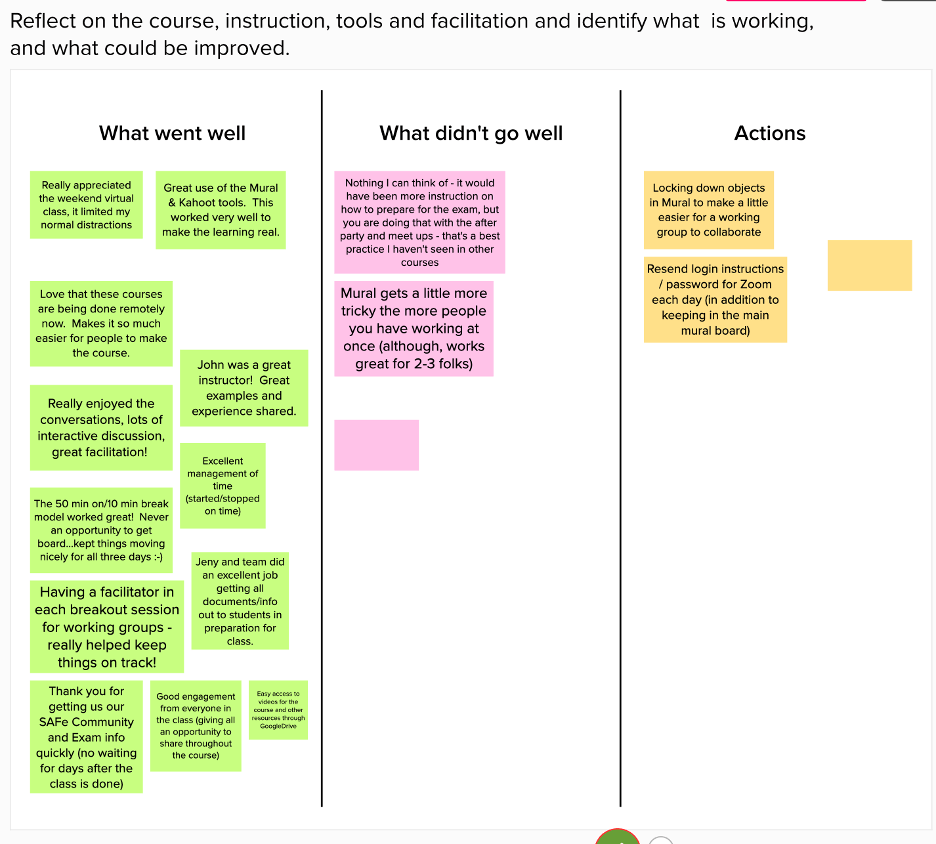
Temenos+Agility course delivery and facilitation model
A key to the instructor and participant positive feedback is the delivery model Temenos+Agility has created. Starting with the guidance provided by SAFe on multiple instructors and the need for a virtual technology assistant, Temenos+Agility added additional elements to build out a model that has proven successful for 2, 3 and 4 day courses without extending the number of course days. Course schedule is straightforward with the course starting at 9 AM in a designated time zone. The instruction/break schedule is 50/10 each hour with an hour for lunch mid-day. The goal is to complete the day with time for an end of day wrap up within a typical course schedule. The Temenos+Agility model includes facilitation support for each group break out to keep the teams on task to complete the activities aligned to the course instruction goals. This requires a significant amount of instructor engagement but is paying dividends in participant feedback.
Instructor logistics and preparation for virtual course delivery
One of the challenges of virtual course delivery is the coordination of content and activities throughout the day. What quickly became clear is the need for detailed plans and alignment prior to the start of the day. There is little opportunity to collaborate during the day that those time should be reserved for “course corrections.” The next consideration is the user interface for the instructor. In preparation for my first course I had the Instructor guide on my iPad, my phone for text messages and my laptop for presentation of course material and voice/video feeds. I was certain that I was set with plenty of screens. However, the Zoom interface on the iPad and iPhone did not allow for a gallery view of the course participants while I was delivering content – this meant that I could not see the class and could not see them when I was answering questions. This taught me that I needed one more screen so I bought an iMac to present the class to me on a 21-inch screen. See below for my “Instructor Cockpit” that has been very effective the last 11 days of instruction.

How we introduced Mural for Lean Portfolio Management course
The initial course delivery of Implementing SAFe was conducted using a shared drive for the team activities using a combination of Slides and Sheets as well as Lean Kit tool for the PI Planning simulation and Value Stream activities. As we approached the LPM course activity creation we wanted to experiment using Mural as the collaboration platform. The benefit hypothesis of the experiment was to provide a platform that engaged all team members on each activity and to provide a single user experience for all activities. Another key need was driven by the activities throughout the course build up to the final activity where each participating organization creates a personalized LPM implementation roadmap. mural as an outcome of the course. Using Mural duplication and users privileges we were easily able to provide each organization a space to collaborate separate from all of the other course participants. There are other functions in Mural that were very helpful in delivering a participant experience. We did learn a couple tricks mid-course to lock down content that created some challenges in day #1, but overall Mural received high marks from both participants and facilitators.
 Enterprise Agility